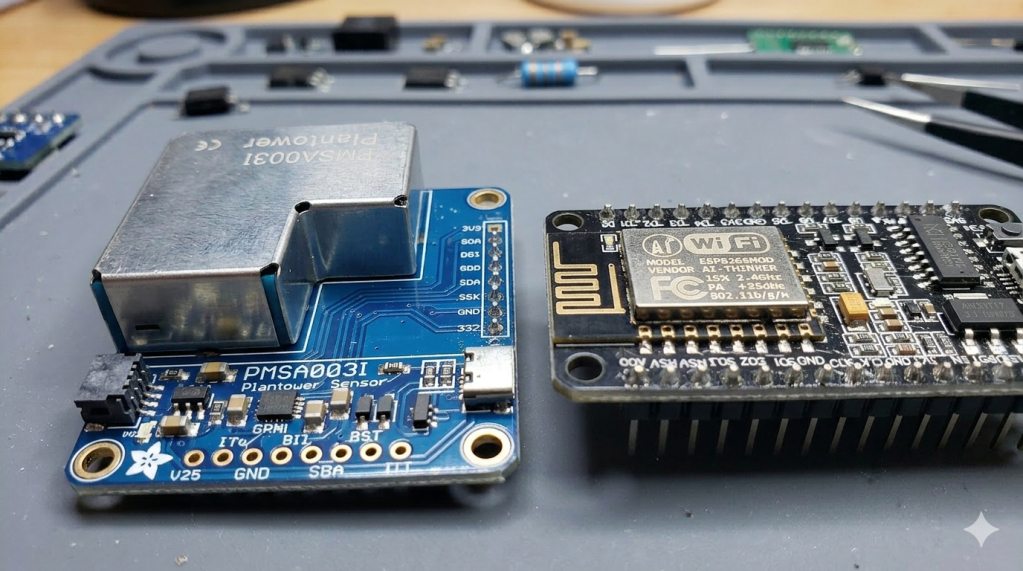
If you’ve ever tinkered with DIY IoT devices, specifically air quality monitoring, you know that not all sensors are created equal. My recent project, an air quality monitor built on a NodeMCU v2 (ESP8266), taught me a humbling lesson. What should have been a simple plug-and-play integration turned into a “dead as a doornail” scenario involving reverse polarity, almost smoke, and a sensor that refused to speak until it had a 30-second warm-up period.
Expectation vs. Reality: The “Sensing” Silent Treatment
The goal was simple: read particulate matter data from the Adafruit PMSA003I over I2C. However, I hit a wall immediately. If the ESP8266 and the PMSA003I powered up at the same time, the sensor was a ghost. It wouldn’t show up on the bus, and ESPHome would report the I2C scan did not detect a device at 0x12 (it’s hardcoded address). It would set the sensor component as “marked as failed”.
This exposed a fundamental friction between firmware and hardware. ESPHome is aggressive; it attempts to initialize components milliseconds after boot. The PMSA003I, however, is a “slow riser.” It needs time for its internal fan to reach a specific RPM and its laser to stabilize before its internal firmware is ready to handle I2C requests. If the handshake fails during that initial boot window, ESPHome locks the component in a failed state and refuses to try again, even if the sensor wakes up seconds later.
The “Magic Smoke” and Power Pitfalls
I was previously feeding power to the ESP8266 with a USB cable which the ESP stepped down to 3.3V for the PMSA003I power feed. I learned that the PMSA003I sensor could act “funny” if it was running on 3.3V so I found a 5V power adapter, wired it up to the breadboard hosting the ESP8266 and fed the PMSA003I some juice. In my rush during the wiring reconfiguration, I committed a classic homelab sin: reverse polarity. VIN and GND were swapped. I was greeted by the immediate smell of overheated electronics coming from the PMSA003I. After correcting the wiring, the fan spun and the LED lit, but the I2C behavior became erratic, showing “phantom” addresses across the bus.
Beyond the electrical scare, I discovered the ESP8266’s onboard 3.3V regulator is marginal for this sensor. The PMSA003I pulls about 100mA when active. Switching the power source from the NodeMCU’s 3.3V pin to the 5V USB rail (VIN) was the only way to resolve some of these gremlins.
The Winning Logic: Taming the Boot Sequence
To get the system stable, I had to take manual control of the timing. The fix required aligning three independent variables: power state, warm-up time, and initialization priority. By utilizing the SET (D5) and RESET (D6) pins on the PMSA003I, I wrote a cold-start script that holds the sensor in a hardware reset state while the ESP8266 stabilizes, then releases it for a mandatory 30-second countdown.
The breakthrough was using setup_priority in the YAML for the ESP8266. By setting the sensor’s priority to a negative value (e.g., -200), I forced the ESPHome driver to wait until my 30-second boot script finished before it even attempted the first I2C handshake.
YAML
esphome:
  on_boot:
    priority: 600
    then:
      - switch.turn_on: pms_set # Wake the sensor
      - switch.turn_off: pms_reset # Release hardware reset
      - delay: 30s
sensor:
  - platform: pmsa003i
    setup_priority: -200 # Don't initialize until the delay is over
Lessons for the Lab
Now, my air monitor sits quietly, waking up every 15 minutes to sniff the air. If you’re running into similar issues, remember that I2C detection does not imply device readiness. If your sensor is finicky at boot, disable automatic polling and trigger it manually via script once you’re sure the hardware has found its footing. Also, don’t panic if your mass concentration reads 0 µg/m³ while particle counts are non-zero—if you’re near a HEPA filter, that’s just the sensor doing its job (ask me how I know).